
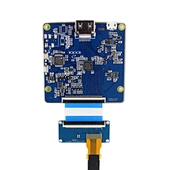
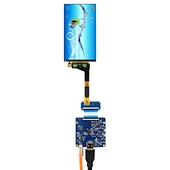
H-DMI Board Work for 50Pin Mipi 5.5inch LS055R1SX04 1440X2560 LCD Screen(can offer without backlight for 3D printer)
K001758 VS-H-DMITMIPI-V1+LS055R1SX04
Quantity:
US $35.00
To
via
DHL
Estimated Delivery on
5-7
Recommend Products
 5.5inch LS055R1SX04 1440X2560 TFT-LCD Screen With H-D-MI To Mipi LCD Controller BoardK002700-VS-CXMIPI-V1+LS055R1SX04 1440x2560
 5.5inch H546UAN01.0 2160X3840 LCD Screen with H/D To Mipi LCD Controller BoardK002698-VS-WH H-DMImipi 4K-V2+H546UAN01.0 5.5inch4K 2160x3840
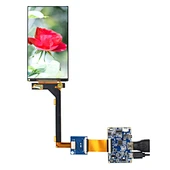 5.5inch LS055T3SX05 1920x1080 Without Backlight LCD Screen With H-DMI To Mipi LCD Controller BoardK002216-VS-CXMIPI-V1+LS055T3SX05 1080x1920
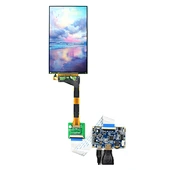 5.5inch 1440X2560 LS055R1SX04 Remove Backlight LCD Screen with H-DMI To Mipi LCD Controller BoardK002215-VS-CXMIPI-V1+LS055R1SX04 1440x2560
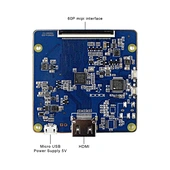
Universal LCD Controller Board:
H-DMI Board Work for 50Pin Mipi LCD Screen
Input Power Adapter: 5Vdc More than 1A.
Come In Standby Model When Not Input Signal
Standby Model <0.3W
Audio Input: H-DMI
Board Size: 65mm x 64mm x 3mm
H-DMI Board Work for 50Pin Mipi LCD Screen
Input Power Adapter: 5Vdc More than 1A.
Come In Standby Model When Not Input Signal
Standby Model <0.3W
Audio Input: H-DMI
Board Size: 65mm x 64mm x 3mm
5.5"LS055R1SX04 1440X2560 LCD Screen:
Display New Mode2, Normally Black, Transmissive
Resolution 1440RGB)×2560
Outline Size 70.94 ×128.49×1.45(H×V×D)
Display Area 68.04× 120.96 (H×V)
Brightness 450 cd/m² (Typ.)
Contrast Ratio 1300:1 (Typ.) (TM)
Viewing Angle 80/80/80/80 (Typ.)(CR≥10) [Left / Right / Up / Down]
Signal Interface MIPI (2 ch, 4 data lanes) , 50 pins , Connector
Backlight WLED
Input Voltage 1.8/5.75/-5.75V (Typ.)(IOVCC/VSP/VSN)
Display New Mode2, Normally Black, Transmissive
Resolution 1440RGB)×2560
Outline Size 70.94 ×128.49×1.45(H×V×D)
Display Area 68.04× 120.96 (H×V)
Brightness 450 cd/m² (Typ.)
Contrast Ratio 1300:1 (Typ.) (TM)
Viewing Angle 80/80/80/80 (Typ.)(CR≥10) [Left / Right / Up / Down]
Signal Interface MIPI (2 ch, 4 data lanes) , 50 pins , Connector
Backlight WLED
Input Voltage 1.8/5.75/-5.75V (Typ.)(IOVCC/VSP/VSN)
Packing list :
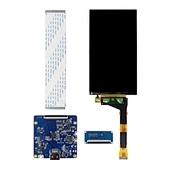
1× H-DMI To Mipi LCD Controller Board VS-HDMITMIPI-V1
1× 5.5inch LS055R1SX04 1440X2560 LCD Screen
1× Signal Cable
1× Converter Board
1× H-DMI To Mipi LCD Controller Board VS-HDMITMIPI-V1
1× 5.5inch LS055R1SX04 1440X2560 LCD Screen
1× Signal Cable
1× Converter Board
Instuction:
1. When H-DMI signal is not accept. It shows black Image and LED flashing on main board. Please change H-DMI source for test.
2. When H-DMI accept. It shows correct image and LED is blue.
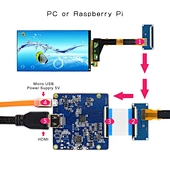
This Board work with PC and Raspberry Pi. The image not support Scaling. It shows image depend on H-DMI input source.
Turn On:
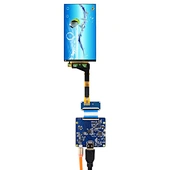
a、Connect Converter Board With LCD Screen Interface
b、Connect Converter Board With 60Pin Cable
c、Connect Main Board With 60Pin Cable
d、Insert H-DMI Type Cable
e、Turn On 5Vdc or USB as Power Supply
Turn Off:
a、Turn Off 5Vdc or Remove USB Power Adapter
b、Remove H-DMI Cable
c、Disconnect Main Board With 60Pin Cable
d、Disconnect Converter Board With 60Pin Cable
e、Disconnect 60Pin Cable With LCD Screen
For PC:
1. Most of MIPI screen for vertical display. Need to adjust computer graphics mode.
2. Replication Mode - Extended mode - Vertical and Horizontal adjustment.
For Raspberry Pi
1. The Main Board Four Locating Holes Compatible With Raspberry Pi.
2. Different Raspberry Pi are set differently. Please connect with Raspberry Pi Technical support.
1. When H-DMI signal is not accept. It shows black Image and LED flashing on main board. Please change H-DMI source for test.
2. When H-DMI accept. It shows correct image and LED is blue.
This Board work with PC and Raspberry Pi. The image not support Scaling. It shows image depend on H-DMI input source.
Turn On:
a、Connect Converter Board With LCD Screen Interface
b、Connect Converter Board With 60Pin Cable
c、Connect Main Board With 60Pin Cable
d、Insert H-DMI Type Cable
e、Turn On 5Vdc or USB as Power Supply
Turn Off:
a、Turn Off 5Vdc or Remove USB Power Adapter
b、Remove H-DMI Cable
c、Disconnect Main Board With 60Pin Cable
d、Disconnect Converter Board With 60Pin Cable
e、Disconnect 60Pin Cable With LCD Screen
For PC:
1. Most of MIPI screen for vertical display. Need to adjust computer graphics mode.
2. Replication Mode - Extended mode - Vertical and Horizontal adjustment.
For Raspberry Pi
1. The Main Board Four Locating Holes Compatible With Raspberry Pi.
2. Different Raspberry Pi are set differently. Please connect with Raspberry Pi Technical support.
Send Message
Comprehensive score